Imagine a single computing platform that must run several operating systems at once. One may be a general-purpose system for navigation, media, connectivity, and diagnostics. Another may be a real-time operating system (RTOS) responsible for safety-critical functions such as engine control, braking assistance, or automated-driving decisions.
Operating systems—such as Microsoft Windows, Linux and Unix—focus on maximizing overall system efficiency and supporting multitasking, but they rely on non-deterministic scheduling. In contrast to a general-purpose OS, a RTOS is designed for real-time applications and guarantees that tasks meet strict timing requirements, often within microseconds. The resources in a real-time system are managed with deterministic scheduling to ensure that high-priority tasks are completed within specific time frames, even under load. While an RTOS can support VMs, the overhead of virtualization may impact its ability to meet real-time demands.[2]
This is not a hypothetical scenario. Advanced Driver Assistance Systems (ADAS) in modern vehicles perform functions ranging from assisted parking and lane keeping to increasingly autonomous driving. As vehicle functions move from dedicated hardware into software, automotive architectures are shifting from many distributed electronic control units toward centralized compute platforms. These platforms must run mixed workloads—such as infotainment, sensor processing, and safety-critical control—together on shared hardware. [1][3]
Below is a model of the high-level ADAS platform [5]
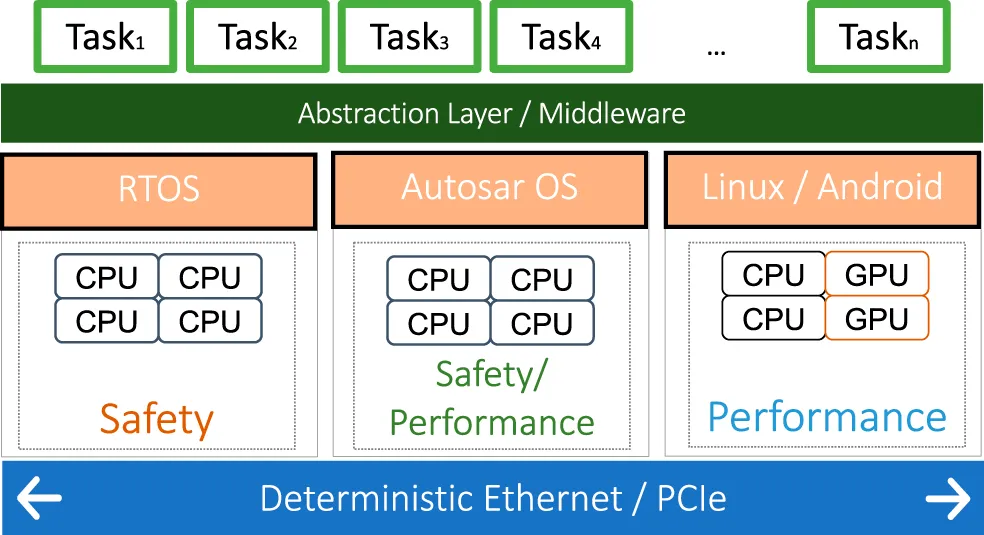
In order to provide a common execution environment and hardware abstraction, a middleware layer is running on top of each operating system. Tasks performing software functions of different criticality levels communicate with each other both on- and off-chip through different means. On-chip communication means data exchange between software tasks, cores, accelerators, or virtual machines that run on the same System-on-Chip (SoC). On-chip communication is usually done through buffers, message passing, or shared memory. Off-chip communication means data exchange between different physical chips, boards, or compute units—for example, between a central ADAS SoC, a separate safety microcontroller, a radar processor, or a domain controller. Off-chip communication is achieved either through PCIe or TSN:
- PCIe (Peripheral Component Interconnect Express): A high-speed point-to-point bus used to connect processors, accelerators, network cards, storage, or other compute modules. In ADAS, it may connect a main SoC to a GPU, AI accelerator, or another processing board.
- TSN (Time-Sensitive Networking): A set of Ethernet standards that add deterministic timing, bounded latency, traffic shaping, and synchronization to standard Ethernet. In a centralized vehicle architecture, TSN lets sensors, controllers, and compute nodes exchange time-critical data over the vehicle network.[5]
Middleware and hypervisor both provide abstraction and may work closely together. For example, DDS, SOME/IP, or a custom IPC layer may connect an ADAS application in one VM to a sensor-fusion service in another VM. Underneath, that middleware may use a hypervisor-provided shared-memory channel or virtual network. [17]
The hypervisor provides controlled inter-VM communication primitives—such as shared memory, event channels, virtual sockets, or virtual networks—and middleware can use those primitives to build safe communication between operating systems. [18]
A structure of the CCECS (Covert Channel using Event Channel State) is depicted below. [18]
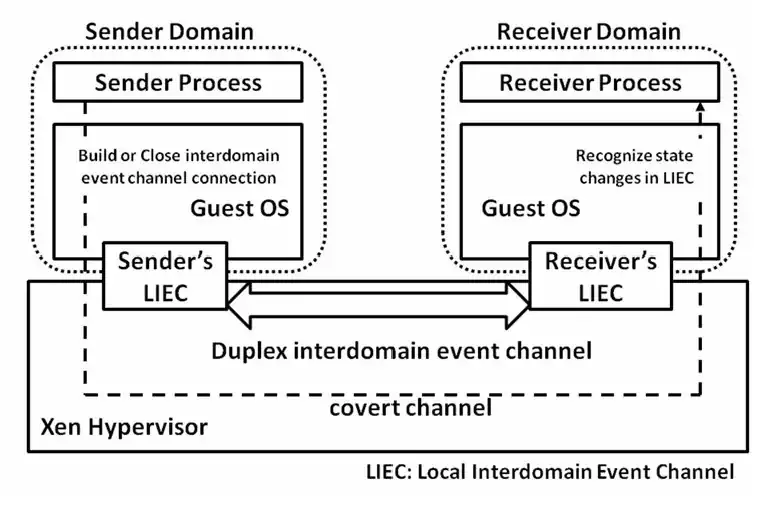
In Xen, for example, domains normally cannot directly access one another’s memory. To communicate, they use mechanisms provided or mediated by Xen:
- Shared memory / grant tables: one domain explicitly grants another controlled access to specific memory pages.
- Event channels: lightweight asynchronous notifications—sometimes called ports—used to signal that data is available.
- Virtual devices: such as virtual network interfaces or vsock-style sockets, implemented through front-end/back-end drivers.
- Hypercalls: controlled requests from a guest to the hypervisor for privileged operations. [18]
Virtualization makes this consolidation possible. A hypervisor can run a general-purpose OS and an RTOS side by side while isolating their memory, devices, and CPU resources. However, isolation alone is not enough for safety-critical systems: they also need deterministic scheduling, bounded communication latency, and guaranteed access to CPU time and I/O. Otherwise, a less critical workload—such as an infotainment application—could interfere with a time-critical RTOS workload. [2][4]
This is where virtualization becomes more than a convenience for developers and testers. It becomes a foundation for production systems that must combine flexibility, resource efficiency, and strict isolation.
In safety-critical industries, however, virtualization must be engineered within established standards. Automotive systems commonly follow ISO 26262, while airborne software follows DO-178C. These standards require rigorous specification, verification, validation, and documentation of the complete hardware and software configuration—not testing alone.
Safety and certification
Virtualization enables consolidation, but safety-critical production systems require more than the ability to run multiple operating systems on one platform. They require controlled resource allocation, deterministic behavior, fault containment, traceability, and evidence that the complete system meets its safety goals.
In an automotive platform, for example, a hypervisor may allow a general-purpose operating system for infotainment and connectivity to coexist with an RTOS responsible for time-critical control functions. The hypervisor separates their memory, devices, interrupts, and CPU resources, while the RTOS provides predictable task execution and bounded response times. This combination is valuable only if the integrated system can demonstrate that a failure, delay, or compromise in the less critical domain cannot violate the safety goals of the critical domain. [6]
Isolation is necessary, not sufficient
A hypervisor provides important technical mechanisms:
- Spatial isolation: separate memory address spaces, device access, and interrupt handling.
- Temporal isolation: controlled CPU scheduling so that one workload cannot consume all processing time.
- Fault containment: a fault in one VM or partition should not directly corrupt another.
- Controlled communication: data crosses security or safety boundaries only through defined interfaces.
- Independent update paths: non-critical components can be updated without directly modifying safety-critical software.
However, isolation does not automatically make a system safe. A virtualized platform must still be designed, analyzed, verified, validated, and documented as a complete system. The hypervisor, RTOS, guest operating systems, drivers, communication paths, hardware, and update mechanisms all become part of the safety argument. [6]
Spatial versus temporal isolation
| Aspect | Spatial isolation | Temporal isolation |
|---|---|---|
| Main question | What resources can a workload access? | When and for how long can a workload execute? |
| Primary goal | Prevent one workload from accessing or corrupting another workload’s resources | Prevent one workload from delaying or starving another workload |
| Protected resources | Memory, devices, interrupts, I/O ports, DMA channels, and communication channels | CPU time, cache, memory bandwidth, network bandwidth, and interrupt handling |
| Typical mechanism | Memory Management Unit (MMU), IOMMU, partitioned memory, device assignment, access-control policies | Fixed-priority scheduling, time-triggered scheduling, CPU reservation, bandwidth limits, watchdogs |
| Failure prevented | Unauthorized access, memory corruption, device conflicts, data leakage | Priority inversion, missed deadlines, jitter, starvation, and unpredictable latency |
| Example in a vehicle | The infotainment VM cannot read or write memory used by the braking-control RTOS | A frozen navigation application cannot prevent the braking-control RTOS from meeting its deadline |
| Example in a data center | One VM cannot access another VM’s memory or storage | A CPU-intensive VM cannot prevent a latency-sensitive VM from receiving its reserved CPU time |
| Hypervisor role | Enforces memory and device boundaries between VMs or partitions | Schedules vCPUs, limits resource consumption, and preserves execution budgets |
| RTOS role | Uses protected memory and controlled device access | Executes periodic tasks with deterministic deadlines and bounded jitter |
| Needed for | Confidentiality, integrity, fault containment, and secure multi-tenancy | Real-time behavior, determinism, predictable latency, and safety-critical control |
| Typical evidence | Memory-protection tests, IOMMU configuration checks, device-access tests | Worst-case execution-time analysis, scheduling analysis, latency and jitter measurements |
| Limitation | Does not guarantee timely execution by itself | Does not prevent unauthorized memory or device access by itself |
Spatial and temporal isolation are complementary. A safety-critical RTOS needs both: spatial isolation to ensure that other workloads cannot access its memory or devices, and temporal isolation to ensure that those workloads cannot consume the CPU time needed to meet real-time deadlines.
ISO 26262 for automotive systems
ISO 26262 is the automotive functional-safety standard for safety-related electrical and electronic systems in road vehicles. It defines a safety lifecycle covering concept, system and hardware/software development, production, operation, service, and decommissioning. [1][2]
A central concept is the Automotive Safety Integrity Level (ASIL). The ASIL is determined through hazard analysis and risk assessment, and it determines the rigor required for safety activities. Higher ASILs require more demanding development, verification, validation, and confirmation measures. [2][3]
| ISO 26262 activity | Why it matters in a virtualized platform |
|---|---|
| Hazard analysis and risk assessment | Identifies hazardous events and determines the required ASIL |
| Safety requirements | Defines what the hypervisor, RTOS, hardware, and communication paths must guarantee |
| Architectural design | Establishes partitions, resource allocation, and freedom from interference |
| Verification and validation | Demonstrates that isolation, timing, and safety mechanisms work as intended |
| Dependent-failure analysis | Examines whether shared resources or failures can undermine independence |
| Safety case | Collects the evidence needed to argue that residual risk is acceptable |
ISO 26262 also addresses the coexistence of elements with different safety integrity levels. In a virtualized vehicle platform, this is directly relevant when a Linux or Android infotainment domain shares a SoC with an ASIL-rated RTOS domain. [3]
DO-178C for airborne software
DO-178C, Software Considerations in Airborne Systems and Equipment Certification, is the primary standard for safety-critical software in commercial aircraft. Unlike ISO 26262, it is aviation-specific and focuses on the software development lifecycle, including planning, development, verification, configuration management, quality assurance, and certification liaison. [4][7]
DO-178C uses Design Assurance Levels (DALs), from DAL E, which has no safety effect, to DAL A, which applies to catastrophic failure conditions. Higher DALs require more objectives and more rigorous verification, including independent verification for many high-criticality objectives. [4][7]
| DAL | Failure-condition category | Practical implication |
|---|---|---|
| A | Catastrophic | Highest rigor; 71 objectives, including 30 with independence |
| B | Hazardous | 69 objectives, including 18 with independence |
| C | Major | 62 objectives, including 5 with independence |
| D | Minor | 26 objectives, including 2 with independence |
| E | No safety effect | No DO-178C objectives |
A virtualization platform used in avionics must therefore support the certification argument for the whole system: the hypervisor, RTOS, applications, configuration, and verification evidence must align with the required DAL. [4][7]
What this means for Xen and Hyper-V
| Topic | Xen | Hyper-V |
|---|---|---|
| Core isolation model | Domains, with optional driver-domain separation | Root and child partitions |
| Safety-critical use | Common in embedded, automotive, and mixed-criticality research and products | More commonly used in enterprise, industrial, and Windows-centric infrastructure |
| Certification approach | Depends on the complete platform, toolstack, RTOS, hardware, and safety case | Depends on the complete Windows/Hyper-V platform, guest configuration, and safety case |
| Practical implication | Xen itself is not automatically safety-certified merely because it is open source | Hyper-V is not automatically safety-certified merely because it is a Microsoft product |
| Best practice | Use a qualified or certified platform stack and document the safety argument | Use a qualified or certified platform stack and document the safety argument |
Neither Xen nor Hyper-V should be treated as a certification shortcut. A hypervisor can make mixed-criticality consolidation technically possible, but certification depends on the complete integrated system, its development process, its evidence, and its compliance with the applicable safety standard. [6]
Practical safety checklist
When evaluating a virtualized RTOS platform, ask:
- Which safety standard applies: ISO 26262, DO-178C, IEC 61508, or another domain-specific standard?
- What ASIL, DAL, or safety integrity level is required for each workload?
- Does the hypervisor provide the required spatial and temporal isolation?
- Are CPU cores, memory, interrupts, timers, and devices allocated deterministically?
- Can a fault or security breach in a non-critical guest affect the RTOS?
- Are communication paths between domains bounded, authenticated, and monitored?
- Is there a documented safety case covering the hypervisor, RTOS, guests, hardware, and configuration?
- Can the system be updated without invalidating the safety argument for critical components?
Platform overview
Xen and Hyper-V are both Type 1 (bare-metal) hypervisors, but they differ sharply in ecosystem: Xen is open source, Linux-oriented, and highly flexible; Hyper-V is Microsoft’s Windows-native virtualization platform with deep Windows Server and Azure integration.[8][9]
| Aspect | Xen | Microsoft Hyper-V |
|---|---|---|
| Hypervisor type | Type 1, bare-metal, open source | Type 1, bare-metal, Microsoft proprietary |
| Primary ecosystem | Linux-first, cloud, embedded, automotive, security-focused systems | Windows Server, Active Directory, System Center, Azure Local, Azure hybrid cloud |
| Hardware architectures | x86/x86-64 and Arm; RISC-V support is progressing | x64 Windows and Windows Server platforms |
| Licensing | Open source; available through Xen Project and distributions such as XCP-ng | Included with eligible Windows and Windows Server editions |
| Management model | Dom0 plus toolstack such as XAPI, xl, or Xen Orchestra | Windows root partition plus Hyper-V Manager, PowerShell, Windows Admin Center, and Failover Cluster Manager |
| Best fit | Open, customizable, Linux-centric, multi-architecture infrastructure | Windows-centric enterprise estates and Microsoft hybrid-cloud environments |
Xen is an open-source bare-metal hypervisor that shares hardware resources among virtual machines, while Hyper-V is Microsoft’s hypervisor-based virtualization technology for supported x64 Windows platforms.
Architecture comparison
| Area | Xen | Hyper-V |
|---|---|---|
| Privileged component | Dom0: a privileged control VM, commonly Linux-based | Root partition: a privileged Windows partition |
| Device drivers | Typically handled in dom0 | Handled by the Windows root partition |
| Guest isolation unit | Domain (domU) | Partition |
| Guest I/O path | Xen PV drivers, event channels, and shared memory | VMBus and synthetic device providers in the root partition |
| Device emulation | Avoided in PVH; available in HVM through a device model | Available for legacy compatibility; synthetic devices preferred for modern guests |
| Management separation | Hypervisor is small; management and drivers live in dom0 | Small hypervisor plus Windows root partition management stack |
| Main architectural trade-off | More flexible and open, but requires dom0/toolstack expertise | Simple Windows-native operations, but depends on the Windows root partition |
Xen architecture
In Xen, the hypervisor itself is intentionally minimal. It schedules virtual CPUs, manages memory, and enforces isolation between domains, but it does not include general-purpose device drivers or a full management stack. Those responsibilities belong to dom0, a privileged Linux-based control domain.
Guest virtual machines, called domUs, communicate with dom0 through Xen’s paravirtualized interfaces: hypercalls, event channels, shared-memory rings, and PV drivers. This design allows Xen to remain small and flexible, while dom0 handles storage, networking, console access, and VM lifecycle management.
A key advantage is that Xen can separate responsibilities further. For example, a driver domain can own network or storage hardware instead of placing all drivers in dom0. This can reduce the impact of a driver fault and supports stronger isolation in security-sensitive designs.
Hyper-V architecture
Hyper-V also uses a Type 1 hypervisor, but its privileged component is the root partition—also called the parent partition. This is a Windows instance that hosts the virtualization service providers, device drivers, management services, and the user-facing management stack.
Guest VMs run in child partitions. Modern enlightened guests communicate with device providers in the root partition through VMBus, Hyper-V’s high-speed paravirtualized communication channel. This is how synthetic storage, networking, and other devices achieve better performance than fully emulated hardware.[9]
The practical trade-off is integration versus independence. Hyper-V benefits from native Windows driver support, PowerShell automation, clustering, and Microsoft ecosystem integration, but the Windows root partition is a central privileged component. Xen offers more architectural flexibility and a smaller hypervisor core, but typically requires more Linux and dom0 operational expertise. In short, Xen separates the hypervisor from management and drivers by using a Linux control domain, while Hyper-V embeds those responsibilities in a Windows root partition. Neither design is inherently superior; the better fit depends on whether your team values Xen’s openness and flexibility or Hyper-V’s Windows-native integration and operational familiarity.[8]
Guest modes and generations
| Topic | Xen | Hyper-V |
|---|---|---|
| Modern guest mode | PVH | Generation 2 |
| Firmware | No BIOS or legacy firmware in PVH; direct kernel boot | UEFI firmware |
| Boot disk | Direct kernel/bootloader configuration | SCSI-based VHDX |
| Legacy devices | PVH avoids QEMU device emulation and most emulated devices | Generation 2 removes IDE, legacy network adapter, and virtual floppy |
| I/O model | Xen PV drivers and event channels | Hyper-V VMBus synthetic devices |
| Security features | Smaller attack surface through reduced emulation | Secure Boot, virtual TPM, shielded VMs, and virtualization-based security |
| Guest requirement | Guest kernel must be PVH-aware | Guest OS must support UEFI and Hyper-V synthetic devices |
| Typical use | Modern Linux and FreeBSD guests | Modern Windows, Linux, and FreeBSD guests |
Xen PVH is a lightweight HVM-like guest without a device model, while Hyper-V Generation 2 uses modern UEFI firmware, SCSI boot, and enhanced security features. [10][11]
Simple mental model
-
Xen PVH is primarily about how the guest interacts with Xen: minimal emulation, PV I/O, hardware-assisted memory/CPU virtualization.
-
Hyper-V Gen 2 is primarily about the VM’s hardware generation: UEFI, SCSI, synthetic devices, and modern security features.
A useful analogy: PVH is Xen’s streamlined guest mode, while Gen 2 is Hyper-V’s modern VM template. Both reduce legacy emulation, but PVH is more tightly tied to Xen’s paravirtualized interface, whereas Gen 2 is a broader Hyper-V platform generation with UEFI and security features built in.[10]
Performance considerations
Both platforms can deliver production-grade performance, especially when guests use paravirtualized or synthetic I/O rather than emulation.
-
Xen can be very efficient with PV or PVH guests because those guests cooperate directly with the hypervisor through hypercalls, event channels, and shared memory. Its minimal hypervisor design also keeps the privileged component small.
-
Hyper-V performs particularly well with enlightened Windows and Linux guests using VMBus-based synthetic devices; unenlightened guests fall back to more emulation and generally incur more overhead.
-
For I/O-heavy workloads, the host storage stack, network configuration, guest drivers, and CPU pinning often matter more than the Xen-versus-Hyper-V choice itself.
-
For many small VMs, both benefit from right-sizing vCPUs and memory; overcommitment can create contention regardless of hypervisor.
| Workload | Xen PVH versus plain HVM | Hyper-V Gen 2 versus Gen 1 |
|---|---|---|
| VM startup | Usually faster because PVH avoids BIOS and QEMU device-model startup | Usually faster and more modern because of UEFI and synthetic devices |
| CPU-bound work | Often similar; results depend on CPU, kernel, and workload | Usually similar; enlightened guests perform best |
| Memory management | Often efficient because PVH combines hardware assistance with a lean Xen interface | Efficient with enlightened guests and modern memory configurations |
| Disk I/O | Usually better than emulated HVM because PV drivers avoid emulation | Usually better with VMBus synthetic storage than legacy IDE-based Gen 1 |
| Network I/O | Often better with PV network drivers than emulated NICs | Usually better with synthetic network adapters than legacy adapters |
| Graphics/GPU | Depends on the chosen GPU virtualization approach | GPU Partitioning shares one physical GPU across multiple VMs; DDA dedicates a GPU to one VM |
| Overall expectation | Comparable to PVHVM for most runtime work; main benefits are lighter startup and reduced emulation | Clear improvement over Gen 1 for modern guests, especially with UEFI, Secure Boot, and synthetic I/O |
Xen PVH usually gives small to moderate gains over plain HVM—mainly from removing QEMU device emulation and using PV drivers—rather than a universal large speedup. The gain is workload-specific: often noticeable in boot time, memory management, and I/O latency, but sometimes negligible or even negative for CPU-bound 64-bit workloads.[10][12]
The clearest comparison is not always PVH versus HVM, because many “HVM” guests are actually PVHVM—HVM guests using Xen PV disk/network drivers. PVHVM already removes most emulated-I/O overhead, so PVH’s remaining advantage over a well-configured PVHVM guest is usually modest.
- Xen’s performance-tuning material explicitly warns that there is no fixed rule: PV-style modes often improve I/O, but 64-bit PV-mode guests can be slower for some workloads.
- A FreeBSD PVH porting presentation concluded that PVH should deliver performance similar to PVHVM while being lighter-weight.
- Xen Project material describes PVH as intended to provide PVHVM-like runtime performance, with faster startup and a smaller attack surface.
- Research comparing Xen PV and HVM found PV generally better for disk I/O because PV drivers avoid hardware emulation, but also found HVM could outperform PV for some CPU/memory-heavy workloads. That distinction matters because PVH combines hardware-assisted CPU/memory handling with PV I/O.
Security and isolation
| Capability | Xen | Hyper-V |
|---|---|---|
| Isolation boundary | Domains separated by the Xen hypervisor | Partitions separated by the Hyper-V hypervisor |
| Privileged component | Dom0; can be separated from driver domains | Windows root partition |
| Device-driver isolation | Can use driver domains to isolate drivers from dom0 | Drivers remain in the Windows root partition |
| Secure Boot | Depends on guest and platform configuration | Supported and recommended for Generation 2 VMs |
| Virtual TPM | Depends on guest and toolstack support | Supported for Generation 2 VMs |
| Confidential/protected VMs | Strong isolation model; implementation depends on platform and toolstack | Shielded VMs, Host Guardian Service, and virtualization-based security |
| Security posture | Small hypervisor and reduced emulation in PVH reduce attack surface | Deep integration with Windows security, hardware root of trust, and Microsoft security tooling |
Hyper-V Generation 2 VMs support Secure Boot, virtual TPM, shielded VMs, and other security features, while Xen PVH reduces the attack surface by avoiding a device model and most emulated devices. [10][11]
Scalability and production features
| Capability | Xen | Hyper-V |
|---|---|---|
| VM memory limit | Xen 4.22 supports x86 guests up to 8 TiB; hosts up to 12 TiB are supported | Windows Server supports VMs with up to 240 TB of memory and 2,048 virtual processors |
| Multi-architecture support | x86/x86-64 and Arm; RISC-V is progressing | x64 only |
| GPU sharing | Depends on the Xen-based platform and GPU vendor stack | GPU Partitioning shares one GPU across multiple VMs; DDA assigns an entire GPU |
| Live migration | Supported through the Xen toolstack and platform | Supported, including live migration with GPU Partitioning in Windows Server 2025 |
| High availability | Depends on the chosen Xen platform, such as XCP-ng or XenServer | Native Windows Server failover clustering |
| Automation | xl, libvirt, XAPI, Xen Orchestra, infrastructure-as-code tools | PowerShell, Windows Admin Center, System Center, Azure tooling |
| Long-term support | Xen 4.22 has support until July 2029 and security support until July 2031 | Follows the Windows Server lifecycle and support policy |
Xen 4.22 was released in July 2026 and provides long-term support through 2029, while Windows Server Hyper-V emphasizes large-scale VMs, GPU partitioning, clustering, and Azure-oriented management. [13][14][15]
Operations and ecosystem
| Area | Xen | Hyper-V |
|---|---|---|
| Primary operating system | Linux-based dom0 | Windows Server root partition |
| Administration skills | Linux, Xen toolstack, networking, storage, and dom0 operations | Windows Server, PowerShell, Active Directory, clustering, and Hyper-V tooling |
| Open-source flexibility | High; multiple toolstacks and distributions | Limited; Microsoft-controlled platform |
| Microsoft integration | Possible, but not native | Native integration with Windows, Active Directory, Azure Local, and Azure services |
| Container platforms | Commonly paired with Linux and cloud-native tooling | Works well with Windows containers, Linux containers through WSL2 or compatible Linux guests, and Azure services |
| Embedded and automotive use | Strong fit; Xen 4.22 targets cloud, embedded, and automotive systems | Less common for embedded or automotive deployments |
| Best operational fit | Teams comfortable with Linux and customizable infrastructure | Teams standardized on Windows Server and Microsoft management tooling |
Xen 4.22 specifically strengthens open-source virtualization for cloud, embedded, and automotive systems, whereas Hyper-V is designed around Windows Server virtualization and Microsoft’s hybrid-cloud ecosystem. [16][17]
Decision matrix
| Your requirement | Better fit | Why |
|---|---|---|
| Linux-first private cloud | Xen | Open-source control, Linux-oriented dom0, and flexible tooling |
| Windows Server estate | Hyper-V | Native Windows integration, familiar tooling, and Microsoft support |
| Arm servers or embedded systems | Xen | Strong Arm support and ongoing RISC-V work |
| Azure hybrid cloud | Hyper-V | Tight integration with Microsoft and Azure-oriented infrastructure |
| GPU sharing across several VMs | Hyper-V | GPU Partitioning provides a supported model for sharing a physical GPU |
| Security-sensitive isolation research | Xen | Small hypervisor, dom0/driver-domain separation, and reduced emulation in PVH |
| Windows-centric secure VMs | Hyper-V | Secure Boot, vTPM, shielded VMs, and virtualization-based security |
| Automotive or safety-critical systems | Xen | Xen 4.22 includes automotive and functional-safety-oriented work |
| Simple Windows-native operations | Hyper-V | PowerShell, Hyper-V Manager, Failover Cluster Manager, and Windows Admin Center |
| Maximum openness and platform choice | Xen | Open-source hypervisor with multiple distributions and toolstacks |
This is not a simple “which is better?” comparison. Both platforms can run demanding production workloads; the better choice depends on whether your priorities align more closely with Xen’s openness and flexibility or Hyper-V’s Windows-native integration and Microsoft ecosystem.
References
- ISO, ISO 26262-10:2018 — Road vehicles — Functional safety
- IBM, What is a real-time operating system (RTOS)?
- IEEE, Advanced Driver Assistance Systems (ADAS)
- Ansys/Synopsys, What is DO-178C?
- Frontiers in Robotics and AI, High level platform model of ADAS
- Wind River, Balancing Operating Systems for Safety-Critical Applications
- DO-178.org, DO-178C: Software Verification
- Xen Project, Introduction — Xen Hypervisor
- Microsoft Learn, Hyper-V Architecture
- Xen Project, PVH Specification
- Microsoft Learn, Should I create a generation 1 or 2 VM in Hyper-V?
- Xen Project, Performance tuning Xen
- Xen Project, Xen 4.22 Released
- Xen Project, Support statement for Xen 4.22
- Microsoft, Windows Server Operating System
- Microsoft Learn, Partition and share GPUs with VM on Hyper-V
- NIST, Security Recommendations for Hypervisor Deployment
- Springer, A Covert Channel Using Event Channel State on Xen Hypervisor